> For the complete documentation index, see [llms.txt](https://docs.checkcle.io/llms.txt). Markdown versions of documentation pages are available by appending `.md` to page URLs; this page is available as [Markdown](https://docs.checkcle.io/checkcle-docs-nl/hoofdbewerkingen/instellingenpaneel/3.-meldingsinstellingen.md).
# 3. Meldingsinstellingen
## Meldingskanalen
De **Meldingskanalen** sectie stelt je in staat externe services (zoals Telegram) te configureren om waarschuwingen en systeemmeldingen van CheckCle te ontvangen. Elk kanaal kan naar behoefte worden aangepast, ingeschakeld of uitgeschakeld.
***
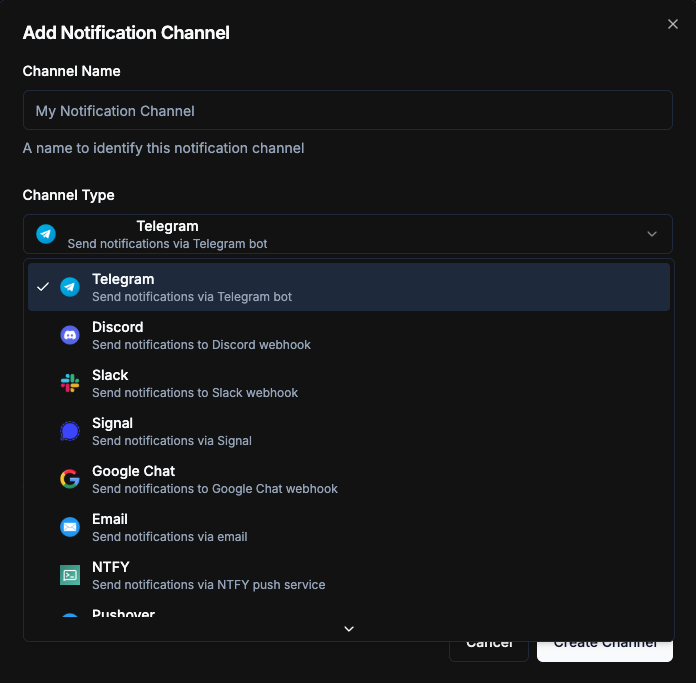
### ➕ Meldingskanaal toevoegen
Bij het aanmaken van een nieuw meldingskanaal moet je de volgende gegevens opgeven:
#### **Kanaalnaam**
* Voorbeeld: `Mijn meldingskanaal`
* Een vriendelijke naam om dit meldingskanaal te helpen identificeren.
#### **Kanaaltype**
* Selecteer de service waarmee meldingen worden verzonden.
* Voorbeeld: **Telegram** (met Telegram-pictogram).
* Aanvullende services:
E-mail Google Chat Slack Discord Telegram Signal
Ntfy Pushover Notifiarr Gotify Webhook
#### **Chat-ID**
* De **Telegram Chat-ID** waar meldingen naartoe worden gestuurd.
* Verkrijg dit door je bot te berichten en de chat-ID op te halen.
#### **Bot-token**
* De **Telegram Bot-token** gemaakt via **@BotFather**.
* Vereist om je bot te authenticeren bij de Telegram API.
#### **Ingeschakeld**
* Schakel om dit meldingskanaal in of uit te schakelen.
* Uitgeschakelde kanalen ontvangen geen meldingen.
***
### Voorbeeld
**Instellen van meldingskanaal:**
* **Kanaalnaam**: `Mijn meldingskanaal`
* **Kanaaltype**: `Telegram`
* **Chat-ID**: `123456789`
* **Bot-token**: `123456:ABC-xyz`
* **Ingeschakeld**: ✅
***
### Acties
* **Bewerken** – Werk kanaalnaam, type of referenties bij.
* **Uitschakelen/Inschakelen** – Stop tijdelijk met of hervat het verzenden van meldingen.
* **Verwijderen** – Verwijder het meldingskanaal permanent.
 E-mail
  Google Chat
  Slack
Slack  Discord
  Telegram
  Signal
 Ntfy
Ntfy  Pushover
  Notifiarr
  Gotify
  Webhook
#### **Chat-ID**
* De **Telegram Chat-ID** waar meldingen naartoe worden gestuurd.
* Verkrijg dit door je bot te berichten en de chat-ID op te halen.
#### **Bot-token**
* De **Telegram Bot-token** gemaakt via **@BotFather**.
* Vereist om je bot te authenticeren bij de Telegram API.
#### **Ingeschakeld**
* Schakel om dit meldingskanaal in of uit te schakelen.
* Uitgeschakelde kanalen ontvangen geen meldingen.
***
### Voorbeeld
**Instellen van meldingskanaal:**
* **Kanaalnaam**: `Mijn meldingskanaal`
* **Kanaaltype**: `Telegram`
* **Chat-ID**: `123456789`
* **Bot-token**: `123456:ABC-xyz`
* **Ingeschakeld**: ✅
***
### Acties
* **Bewerken** – Werk kanaalnaam, type of referenties bij.
* **Uitschakelen/Inschakelen** – Stop tijdelijk met of hervat het verzenden van meldingen.
* **Verwijderen** – Verwijder het meldingskanaal permanent.
Webhook
#### **Chat-ID**
* De **Telegram Chat-ID** waar meldingen naartoe worden gestuurd.
* Verkrijg dit door je bot te berichten en de chat-ID op te halen.
#### **Bot-token**
* De **Telegram Bot-token** gemaakt via **@BotFather**.
* Vereist om je bot te authenticeren bij de Telegram API.
#### **Ingeschakeld**
* Schakel om dit meldingskanaal in of uit te schakelen.
* Uitgeschakelde kanalen ontvangen geen meldingen.
***
### Voorbeeld
**Instellen van meldingskanaal:**
* **Kanaalnaam**: `Mijn meldingskanaal`
* **Kanaaltype**: `Telegram`
* **Chat-ID**: `123456789`
* **Bot-token**: `123456:ABC-xyz`
* **Ingeschakeld**: ✅
***
### Acties
* **Bewerken** – Werk kanaalnaam, type of referenties bij.
* **Uitschakelen/Inschakelen** – Stop tijdelijk met of hervat het verzenden van meldingen.
* **Verwijderen** – Verwijder het meldingskanaal permanent.